Showing posts with label iOS 7. Show all posts

Wednesday, January 15, 2014

Apptray lets you launch apps directly from Notification Center


There have been a handful of jailbreak tweaks released for Notification Center in the past few weeks, but perhaps none more visually appealing than Apptray, by software engineerJoshua Lee Tucker.
The tweak, compatible with all iPhone, iPad and iPod touch devices, adds a fourth tab alongside Today, All and Missed in Notification Center for opening apps directly from the notifications pulldown. An unlimited number of apps can be added to Apptray, configurable from the tweak’s dedicated menu in the Settings app… 
Apptray has a few other interesting options, including a slider for adjusting icon opacity and a toggle switch for enabling or disabling the tweak entirely. In order to ensure the security of iOS devices, the tweak cannot open apps from the Lock screen when a passcode is set. In that instance, tapping on an app icon will simply do nothing.
My impression of Apptray has been positive so far, as the tweak performs great on my iPhone 5 running iOS 7.0.4. As a bonus, it even works with themed icons. If you also have an iOS 7 device, Apptray can be yours on the Cydia Store for $1.49.

Aura is an upcoming custom icon theme that supports over 200 apps


While theme makers certainly face increasing challenges because of how iOS 7 is designed, we’ve still seen a handful of great themes for the iPhone, iPad and iPod touch.Aura promises to be the next. The upcoming theme provides well-designed custom icons for over 200 apps and counting, despite its creators—a five-person group called the iApex Team—stressing that it remains in beta with a lot of work to be finished. Even in its claimed infancy, Aura looks fantastic…

I have been testing a pre-release version of Aura on my iPhone for a few hours now, and my first impressions of the theme are very favorable. Each icon has rounded square edges, with support for all stock apps and a growing number of third-party ones: Cydia, Winterboard, BlackBerry Messenger, Google Maps, and more. The only criticism I have is the red-colored Calendar app, as the day of the week is listed in red text and the lack of contrast makes it hard to read.
I was also supplied with a matching Zeppelin logo for Aura, which definitely suits the theme. According to its designers, Aura has been submitted to the ModMyi repository and should appear on the Cydia Store soon. A sale will be offered in the first two days following the theme’s release, and then it will be sold for an undisclosed regular price.

Friday, November 22, 2013

Amazon app redesigned for iOS 7


Just in time for the holidays, Amazon has redesigned its iPhone and iPad app for iOS 7. The update comes a week before Black Friday—the beginning of the biggest shopping weekend of the year for most retailers.
The app gives users virtually full access to the ecommerce giant’s staggering selection of products, which ranges from electronics to clothes, and everything in between. And now it looks right at home on iOS 7 devices…
I love the new look of the app, and find it easier to browse and locate things. But I also like the design of iOS 7. For those who don’t like the new “white space” design trend, you’re probably not going to like this either.
Amazon also mentions that bug fixes are included in today’s update, so unless you absolutely hate the new look, it’s probably worth upgrading. You can find the latest version of the Amazon App in the App Store for free.

Honda says iOS mirroring will be available in 2014 Civic


It looks like Honda is going to be one of the first auto-makers to ship a vehicle compatible with Apple’s new iOS in the Car feature. A representative for the company confirmed with a customer via Twitter that the tech will be available in its 2014 Civic.
For those unfamiliar with iOS in the Car, it’s essentially Apple’s next level of in-car device integration. Where ‘Eyes Free’ only let users access Siri, this will allow users to access apps like Phone, Maps, Music and more via their car’s built-in touchscreen…
Here’s the Twitter exchange via 9to5Mac:

So what does this mean? Well judging from the rep’s comments, users will be able to control their iOS devices using the 7-inch multitouch display that Honda is building into the dash of its 2014 model Civic, which is expected to go on sale in early December.
Additionally, the rep told one customer that Honda would begin rolling out Siri Eyes Free updates for existing vehicles next month as well. So current Honda car owners (presumably only later models) can expect to see that functionality in the near future.

Though it may not seem like it now, iOS in the Car is a big deal for Apple. During a quarterly earnings conference call earlier this year, Tim Cook told investors it’s a “key focus” for the company and as important to its ecosystem as iTunes or the App Store.
Several manufacturers have pledged to support the new tech, including Acura, Mercedes-Benz, Infiniti, Ferrari, Chevrolet, Hyundai, Kia, Volvo, Opel and Jaguar.

Sunday, November 3, 2013

How to set a song as your alarm sound in iOS 7


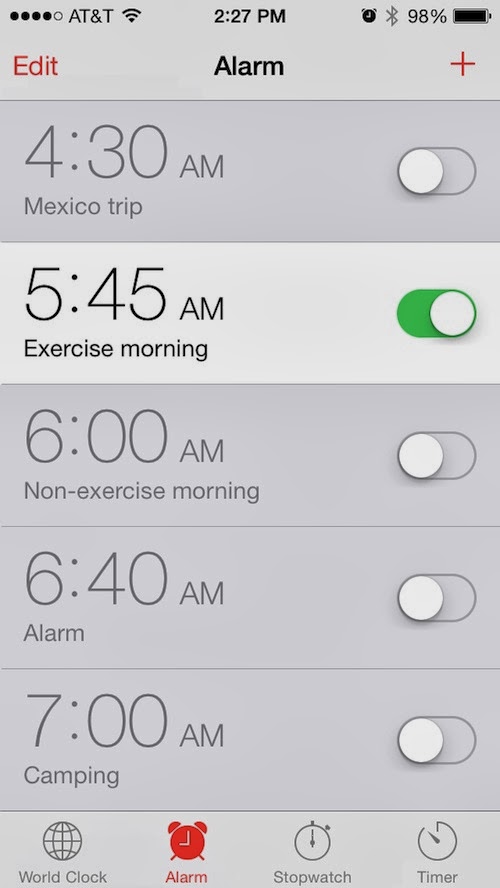
There may be a number of great alarm clock apps in the App Store, but thanks to Apple’s recent iOS 7 update, the native clock app looks good and works great. So, if you want to give the native alarm option a try, you may find that it is the only app you need to wake you up in the morning.
Apple also added a plethora of new chimes and tones to keep your ears interested. But if you are tired of “Night Owl” and “By the Seaside” you will be happy to know that you can add your own music as the alarm sound…
As a reminder, we know that this feature was available in iOS 6 and is not new. We realize that many of our readers have already been using their iTunes music as their alarm sounds. This article is for new iPhone owners who don’t necessarily know everything about their device yet. If you already know how to set music as an alarm, please feel free to move on to another one of our articles that interest you more.
Using your own music as an alarm sound is a lot easier than you might think. Apple makes it fairly easy to find, if you know where to look for it.

Editing a current alarm

How to set a song as alarm sound 4Step 1: Open the Clock app.
Step 2: Select “Alarm” from the icons at the bottom.
Step 3: Tap the “Edit” button in the top left corner of the screen.
Step 4: Select the alarm you wish to use a song for.
Step 5: Tap “Sound”
Step 6: Under “Songs” tap, “Pick a Song.”
Step 7: Select a song from your device’s music library.

Setting a new alarm

How to set a song as alarm sound 5Step 1: Open the Clock app.
Step 2: Select “Alarm” from the icons at the bottom.
Step 3: Tap the plus (+) button in the top right corner of the screen.
Step 4: Set the time, recurrence, and label.
Step 5: Tap “Sound.”
Step 6: Under “Songs” tap, “Pick a Song.”
Step 7: Select a song from your device’s music library.
Now you will be able to set a different song for every day of the week if you want to have a little variety in your life.

Saturday, November 2, 2013

Flipboard gets iOS 7 makeover, new text settings, and more in 2.1 update


Flipboard fans will be happy to hear that the app finally got its proper iOS 7 update, bringing the client to version 2.1. The update brings about a ‘fresh, modern look and feel,’ in-line with Apple’s recent firmware release, and several other improvements.
Among them are speed and performance enhancements across all devices, meaning the app should feel noticeably faster on your iPhone and iPad. There’s also a new feature that allows you to change text size, on-screen alerts for new feed items, and more…
Here are the release notes for version 2.1:
This release is all about performance and polish just in time for the new iPad Air and iPad Mini.

- Speed and performance enhancements throughout. Everything is just faster on all devices.
- Fresh, modern iOS 7 look and feel.
- Ability to change text size settings in the app.
- More section tiles added to the first page on iPhone 5 and 5S.
- On screen alert when there are new items in a feed.
- Dozens of bug fixes and detailed updates.
Feedback is always welcome. Please contact support@flipboard.com with any issues or suggestions. Thank you for using Flipboard.
Flipboard’s last major update, version 2.0, came in March of this year and added the ability to create and share custom magazines, user notifications, and more. And last month, the social news reader announced that it had passed the 90 million user mark.
To grab the latest version of Flipboard for iPhone and iPad, click here (free). And if you’re not already following iDB in the app, be sure to check out our quick tutorial on how to do so.

Sunday, October 27, 2013

iOS still struggling with Daylight Saving Times as some users are affected with yet another bug

Wrong calendar time iOS 7
iOS is no stranger to Daylight Saving Times bugs. It could actually be considered a recurring things as we’ve seen several occurrences of Apple’s operating system not properly adjusting to time changes in the past, most notably back in 2010 and twice in 2011.
After all this time, you’d think Apple would have figured out how to properly adjust such a basic feature, but apparently they haven’t. Some French users are reporting today that although the time has adjusted correctly to the country’s DST change, there is still a little bug visible in the Calendar app…
As you can see on the screenshot above, courtesy of my cousin Jérémy, the time displayed in the Status bar is correct, however, the time displayed by the marker in the Calendar app isn’t showing at the right location. Simply explained, iOS is showing the right time but still believes it is on the previous time.
It appears that some users are affected by the bug, while others are not. This bug doesn’t appear to be linked to a specific device or software version as some users using the same device on iOS 7.0.3 are encountering the issues, while others are not. Could it be a problem linked to carriers, as Rene Ritchie suggests?
From what we gather, scheduled events are placed on the right time slot in Calendar, and maybe most important, alarms are ringing at the right time, so this might very well be the case of a bug that will again resolves itself out once the US change time next week. If that’s the case, Apple might not release a software update immediately, although I can’t imagine the company not fixing this bug going forward.

Saturday, October 26, 2013

How to get rid of the blur effects in iOS 7

Blur Contrast iOS 7 Control Center
Some of you might already be offended just by reading the title of this post. How dare we share tips on how to remove the blur effects in iOS 7? How can we, in just one post, put an end to something that some might consider the essence of iOS 7? Something that the design team at Apple spent months and months working on. Well, we like options and we also like for you to know that you have options.
The main reason why you’d want to disable the blur effects in iOS 7 is to improve contrast on some backgrounds in order to improve legibility. If you have vision problems, removing blur effects might indeed help you see what’s on your screen better.
Of course, you might also not be too fond of the blur effects to begin with, and this is a good reason to get rid of them. For the record, I find those blur effects to be essential to the iOS 7 experience so I didn’t disable them on my own device.
In order to remove blur effects in iOS 7, go to Settings > General > Accessibility > Increase Contrast > On.
Blur Contrast iOS 7 Notification Center
As far as I can tell, the only spots where blur effects are present – and thus where they can be disabled – are in Notification Center and in Control Center. If there are other areas of the UI where blur can be found, I’m sure you will be quick to point it out in the comments.
As you can see from the images above, the changes aren’t dramatic but they are very much noticeable. Control Center will lose its blurry effect for a plain gray background, while Notification Center will gain a black background. I have to say the black background of Notification Center does look pretty slick, but of course, it’s all personal preferences.
What do you think? Are blurry backgrounds enough of an annoyance for you to get rid of them?

Friday, October 18, 2013

Apple sued over automatic iOS 7 update


A California man is taking Apple to court over the recent iOS 7 update, which he says automatically downloaded to each of his family’s devices without his consent. Actually, the small claims court suit is titled ”Mark David Menacher vs. Tim Cook.”
Apple’s over-the-air update mechanism for iOS is designed to make it easier for users to keep their devices up-to-date. But the problem outlined in Menacher’s complaint is that it automatically downloads a 1GB+ file, with no way to remove it…
CNET reports:
“Mark Menacher, a resident of Poway, Calif., filed a small-claims complaint against Apple’s CEO Tim Cook in the Superior Court of California in San Diego on Thursday, asking for the removal of the iOS 7 install file — something that’s downloaded to devices automatically when they’re connected to power and a Wi-Fi connection.
Some users were irked to discover this feature last month, which is designed to get users onto the latest version of Apple’s iOS software, updates that often contain security fixes and new features. However in the case of iOS 7, it also means a brand new look and feel of the OS, along with potential compatibility issues with some pieces of software, and a sizable download that can take up 1GB or more.”
This actually isn’t the first time we’ve heard this complaint. Last month, a thread popped up on Apple’s support forums with users claiming that iOS 7 had auto-installed on their devices, reducing their free hard drive space by as much as 15%.
It’s worth noting that the auto-download feature was present during the jump from iOS 5-iOS 6 as well. But to be fair, the jump from iOS 6 to iOS 7 was much bigger, with the latter sporting a new UI design and several other notable changes.
Here’s more from Mark Menacher:
“Apple’s disregard for customer preferences in relation to iOS7 is corporate thuggery,” Menacher said in a statement. “Steve Jobs was reportedly rough on company employees in pursuit of happy customers, but Tim Cook apparently cultivates a culture of contempt for customer satisfaction in pursuit of corporate profits. It is a policy that will eventually fail.” 
In his complaint, Menacher asks for a way to get rid of the downloaded file, as well as $50 in compensation. He also says he’s “considering” elevating the issue to a higher court, and exploring whether it holds ground for a class action suit.
What are your thoughts on all of this? Does Menacher’s case hold water?